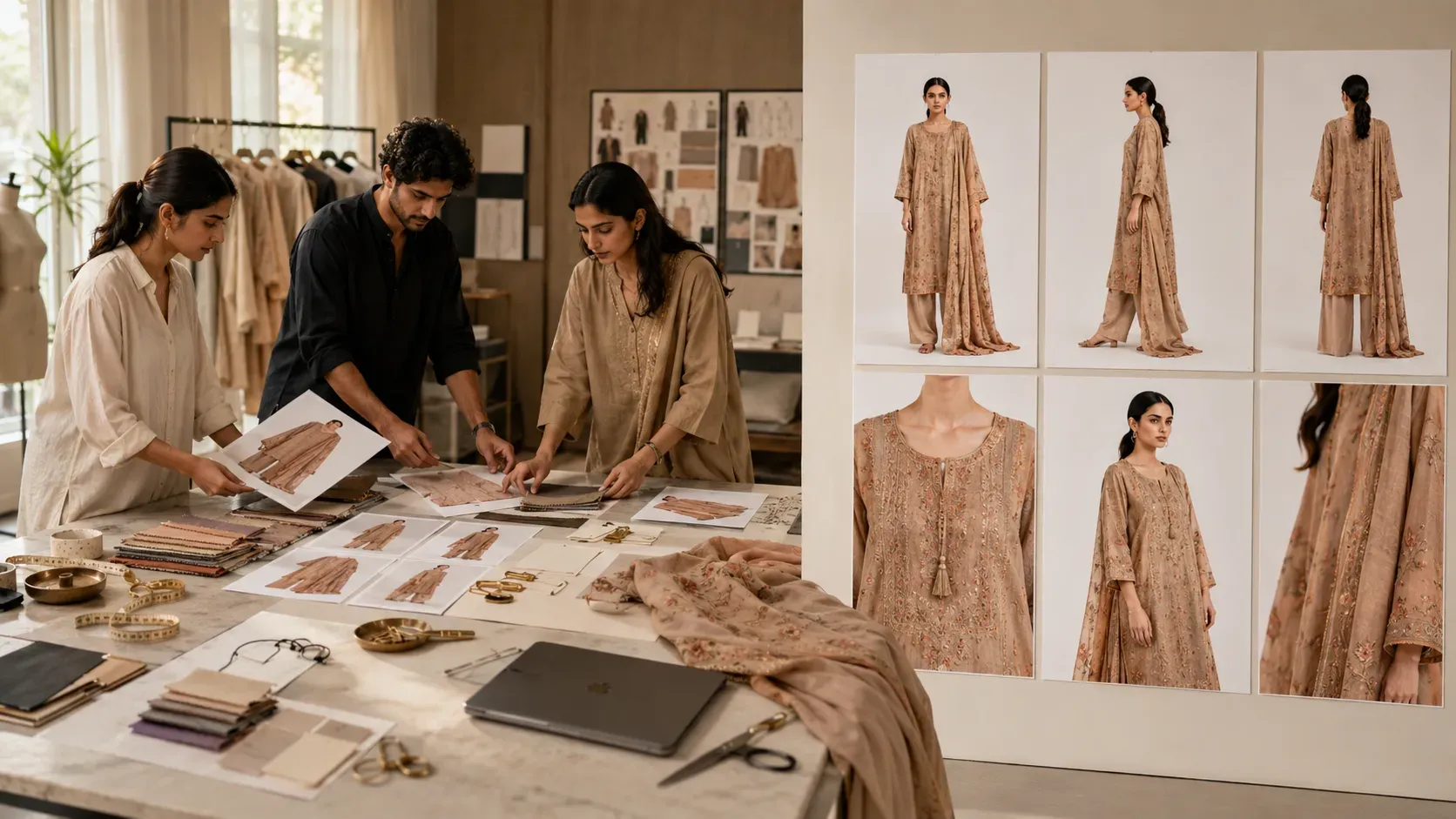
Clothing brands need product images that are clear, professional, and ready for online selling.
A customer does not only want to see one photo of a garment. They want to understand the product properly before buying. They want to see the front view, side view, back view, fabric details, sleeve shape, neckline, fitting, fall, and overall styling.
This is why catalog images are so important for clothing brands.
A good catalog image does not only make the product look attractive. It helps the customer understand the garment better. It builds trust, improves product presentation, and makes the online store look more professional.
Earlier, clothing brands had to depend mainly on traditional photoshoots to create catalog images. They needed a model, photographer, studio, lighting setup, styling team, editing team, and multiple shoot days.
This workflow can work well for premium campaigns, but it becomes slow and expensive when a brand has many products.
Now AI can help clothing brands generate catalog images faster.
With AI catalog generation, brands can upload a model base photo, upload an apparel or garment image, add a portfolio style description, choose the number of showcase views, and generate catalog-ready product visuals.
The Textile AI Catalog tool is built for this exact workflow. It helps fashion and textile businesses create professional multi-angle model portfolios for apparel products, dresses, and textile designs.
Website:
https://www.thetextileai.com/ai/tools/catalog
What Are Catalog Images for Clothing Brands?
Catalog images are product visuals created to show garments clearly and professionally.
They are used on Shopify stores, e-commerce websites, marketplaces, product catalogs, buyer presentations, lookbooks, WhatsApp catalogs, and social media campaigns.
For clothing brands, catalog images usually need more than one angle. A single front photo can show the main look, but it cannot show everything about the product.
A proper clothing catalog may include front view, side view, back view, detail front, detail close-up, and slight angle views. These views help customers understand the garment from different sides.
For example, a front view shows the main design. A side view shows the fit and silhouette. A back view shows the back design and finishing. A close-up view shows fabric texture, embroidery, stitching, buttons, neckline, or sleeve detail.
When these images are clean and consistent, the product looks more trustworthy.
“A catalog image is not just a product photo. It is a visual explanation of the garment.”
Why Clothing Brands Need Catalog-Ready Images
Online fashion selling depends on visuals.
Customers cannot touch the fabric, try the garment, or check the stitching physically. They depend on images to understand the product.
If a clothing brand uses only one low-quality image, customers may not feel confident. They may wonder how the back looks, how the fit falls from the side, or whether the fabric details are clear.
This creates doubt.
Catalog-ready images reduce that doubt.
They give customers more visual information and make the product page stronger. They also help brands look more professional on collection pages and product galleries.
For clothing brands, this matters because product images influence first impressions. A clean product gallery can make a small brand look more premium. A poor product image can make even a good product look ordinary.
Remember: In online fashion, customers trust what they can see clearly.
The Challenge with Traditional Catalog Photoshoots
Traditional catalog photoshoots are useful, but they can be difficult to manage for every product.
A brand needs to prepare the garment, arrange a model, book a studio, set up lights, plan poses, style the product, shoot multiple angles, edit the images, and export them in the correct sizes.
This process becomes more difficult when the brand has many products.
If one garment needs front, side, back, and close-up images, the number of photos increases quickly. If the brand has 50 or 100 garments, the shoot requirement becomes large.
Photoshoots also depend on scheduling. The model must be available. The studio must be booked. The product must be ready. The photographer and editing team need time.
This can delay product launches.
Many clothing brands face the same problem: the products are ready, but catalog images are still pending.
AI catalog generation helps reduce this delay by making the first catalog visual workflow faster.
Tip: Use AI catalog generation for routine product images and use traditional photography for selected campaign shoots or hero products.
What is AI Catalog Generation?
AI catalog generation is the process of using artificial intelligence to create product catalog images.
For clothing brands, it means using AI to generate model-worn product images, front-side-back views, close-up detail shots, and catalog-style portfolio visuals from uploaded inputs.
Instead of creating every image manually through a photoshoot, brands can use AI to generate catalog-ready visuals faster.
This is especially useful for brands that need frequent product images for e-commerce.
AI can help create images for product pages, collection pages, buyer decks, social media, launch campaigns, and internal design approvals.
The goal is not to remove creativity or brand control. The goal is to create product visuals faster, so clothing brands can launch and present products more efficiently.
“AI catalog generation helps clothing brands move from garment input to product gallery faster.”
How The Textile AI Catalog Tool Works
The Textile AI Catalog tool is designed as an AI Catalog Studio for fashion and textile products.
The workflow is simple and practical.
First, the user uploads a model base photo. This helps the AI understand the model identity, pose direction, lighting, body structure, and visual reference.
Second, the user uploads an apparel or garment image. This gives the AI the clothing item that needs to be shown in the catalog output.
Third, the user adds a portfolio style description. This helps guide the final image mood, catalog style, lighting, background, and product presentation.
After that, the user chooses the number of showcase views.
The tool can generate different catalog packages based on the need. A brand can create a single view, a standard multi-angle pack, or a premium catalog book with more views and macro details.
This makes it useful for different business sizes and content requirements.
Website:
https://www.thetextileai.com/ai/tools/catalog
Step 1: Upload a Model Base Photo
The first step is to upload the model base photo.
This image gives the AI a reference for the model. It helps define the face, body structure, pose style, lighting, and overall catalog appearance.
For better results, the model photo should be clear, well-lit, and suitable for fashion product presentation. A clean model base photo helps the final output look more polished and consistent.
This step is important because catalog consistency matters.
If a product gallery has different face styles, different lighting, and different body proportions in every image, the catalog may look unprofessional. A strong model reference helps create a connected visual style.
For clothing brands, this is very useful because consistent visuals make the product page and collection page look cleaner.
Remember: A good model base photo improves the quality and consistency of AI catalog images.
Step 2: Upload the Apparel or Garment Image
The second step is to upload the apparel or garment image.
This image tells the AI which product needs to be shown in the catalog output.
The garment image should clearly show the clothing item. The shape, color, design, neckline, sleeves, fabric pattern, embroidery, buttons, border, and important product details should be visible.
If the garment image is blurry, folded, badly cropped, or poorly lit, the AI may not understand the product properly. This can affect the final result.
For clothing brands, garment accuracy is important. The catalog image should represent the actual product as closely as possible.
Before uploading, brands should check whether the image clearly shows what makes the product valuable.
Tip: Use a clean garment image, especially for products with embroidery, prints, borders, sleeve design, neckline details, or special cuts.
Step 3: Add Portfolio Style Description
The portfolio style description helps guide the output style.
This is where the brand can tell the AI how the catalog should look.
For example, a brand may want a clean e-commerce catalog style, premium fashion lookbook mood, simple studio background, soft daylight, model portfolio look, or detail-focused product gallery.
A clear style description helps the AI generate visuals that match the brand’s need.
A good prompt can include lighting, background, pose style, garment presentation, product detail focus, and catalog mood.
Example:
Create a clean fashion catalog look with natural lighting, consistent model face, soft shadows, front-side-back views, and clear garment details.
This type of instruction is direct and useful.
“A good catalog prompt tells AI how the garment should be presented, not only what garment to show.”
Step 4: Choose the Number of Showcase Views
Different clothing brands need different catalog image sets.
Sometimes one image is enough. Sometimes a full product gallery is needed.
The Textile AI Catalog tool gives options such as Single View, Standard Pack, and Premium Book.
Single View is useful when a brand needs one front view render quickly. It can be used for a quick product preview, internal approval, or simple product listing.
Standard Pack is useful when the brand needs front, side, and back views. This is helpful for product pages because customers can see the garment from multiple angles.
Premium Book is useful when the brand needs all six views and macro-style detail visuals. This is good for premium garments, detailed products, buyer presentations, fashion lookbooks, and full catalog portfolios.
Choosing the right package depends on the product, purpose, and platform.
Remember: A simple product may need one strong image, but a premium garment needs multiple views to explain its value.
Step 5: Generate the Portfolio Catalog
After uploading the inputs and selecting the view package, the user can generate the portfolio catalog.
The AI creates the selected catalog visuals and displays them in the catalog output canvas.
The generated catalog can include different perspectives such as front view, side view, back view, detail front, detail close-up, and slight angle.
This helps brands create a more complete product gallery.
Instead of waiting for a full photoshoot, the brand can create product-ready visuals faster and use them for product listings, catalogs, presentations, or marketing content.
Tip: After generation, always review the output for garment accuracy, face consistency, lighting, product details, and overall realism.
Why Multi-Angle Catalog Images Matter
Clothing is not a flat product.
A garment has shape, fit, fall, stitching, sleeves, neckline, back design, side profile, and fabric behavior. One image cannot show everything.
This is why multi-angle catalog images matter.
Front view helps customers understand the main product look. Side view shows how the garment falls on the body. Back view shows the back design, closure, and finishing. Detail views highlight fabric, embroidery, stitching, buttons, prints, and surface work.
These images make the product page more useful.
A customer who sees multiple angles has fewer doubts. A buyer who sees detail shots can understand quality better.
For clothing brands, this can improve product presentation and customer confidence.
“A complete catalog shows the garment from the customer’s point of view.”
AI Catalog Images for Shopify Stores
Shopify stores need clean and consistent product galleries.
A customer may visit a product page and decide within seconds whether the product feels trustworthy. If the gallery has only one image or inconsistent visuals, the product may not feel complete.
AI catalog generation helps Shopify sellers create better product galleries faster.
A product page can include a main front image, side view, back view, detail close-up, and slight angle model-worn image. This gives customers more clarity.
It also improves the collection page. When all product images follow a similar style, the store looks more organized and premium.
For clothing brands using Shopify, this can be a strong advantage.
Remember: A clean Shopify product gallery can make a fashion brand look more professional.
AI Catalog Images for Clothing Launches
Every clothing launch needs images.
Before launching a new collection, a brand needs product visuals for the website, ads, social media, WhatsApp catalogs, email campaigns, and buyer presentations.
If the images are delayed, the launch gets delayed.
AI catalog generation helps brands create visuals earlier in the launch process.
A brand can upload garment references, generate catalog-style images, review the product presentation, and prepare product content faster.
This is useful for seasonal collections, festive launches, boutique drops, new arrivals, and fast fashion updates.
For small teams, AI can reduce production pressure. For large teams, it can help manage more products at scale.
Tip: Use AI catalog images during launch planning so the marketing team does not wait until the final photoshoot is completed.
AI Catalog Images for Buyer Presentations
Buyer presentations need clarity and polish.
A buyer may not understand a garment fully from a raw product photo. They may want to see how it looks on a model, from multiple angles, and with clear details.
AI catalog generation helps create stronger buyer visuals.
A clothing brand can show front, side, back, and detail views in a professional portfolio style. This helps buyers compare products and understand the collection better.
This is useful for garment manufacturers, wholesalers, export businesses, boutique suppliers, and B2B fashion brands.
A strong presentation can make the product feel more market-ready.
“A polished catalog presentation can make the same garment feel more valuable.”
AI Catalog Images for Sarees and Ethnic Wear
Catalog images are especially important for sarees and ethnic wear.
Ethnic products often include more details than simple garments. Sarees may have pallu, pleats, blouse design, border work, embroidery, zari, and fabric fall. Kurtis may have neckline detail, sleeve pattern, embroidery, and length variation. Lehengas and festive outfits may need back views and close-up work details.
AI catalog generation can help ethnic wear sellers create more complete product visuals.
For saree sellers, AI catalog images can support model-worn product pages and buyer previews. For kurti brands, front-side-back views help customers understand fit and structure. For festive garments, close-up detail shots can highlight embroidery, stone work, or fabric design.
Remember: Ethnic wear needs strong detail presentation because the product value often lives in fabric, border, embroidery, and finishing.
How AI Saves Time for Clothing Brands
Time is one of the biggest reasons clothing brands use AI.
Traditional catalog shoots can take days or weeks. AI helps create catalog visuals much faster from model and garment inputs.
This is useful when a product needs to go live quickly.
If a buyer asks for more angles, the brand can generate catalog views faster. If a product launch is near, the team can prepare visuals earlier. If the brand has many products, AI can help speed up the image creation workflow.
This does not mean real photography is no longer useful.
It means AI gives brands a faster option for regular catalog content.
“AI helps clothing brands reduce the waiting time between product idea and product image.”
How AI Reduces Photoshoot Dependency
Photoshoots are still valuable for final campaigns, hero images, influencer content, and premium storytelling.
But not every product image needs a full photoshoot.
AI catalog generation helps reduce repeated photoshoot dependency for routine product visuals, buyer previews, internal approvals, and online listings.
A brand can use AI to create catalog images first, then decide which products need real photoshoots later.
This helps brands spend photography budgets more carefully.
For small brands, it reduces content creation pressure.
For large brands, it helps scale product image production.
Tip: Use AI for catalog scale and traditional photography for selected brand storytelling visuals.
How AI Improves Visual Consistency
Consistency is important in fashion catalogs.
If every product image has different lighting, different model identity, different framing, and different background style, the store can look messy.
AI catalog generation can help maintain consistency across multiple views.
The tool can preserve model identity, skin tone, hair, and lighting across generated views. This helps create a more connected product portfolio.
For e-commerce stores, consistent visuals make the product grid look clean. Customers can browse more easily, and the brand looks more professional.
Remember: Consistent catalog images create a better shopping experience.
Common Mistakes to Avoid
AI catalog generation works best when inputs are clear.
One common mistake is uploading poor model photos. If the model image is blurry, dark, cropped badly, or unclear, the final result may not look clean.
Another mistake is uploading unclear garment images. The garment should be visible and should show the product’s important design details.
Brands should also avoid vague portfolio style descriptions. If the desired look is catalog-ready, mention clean lighting, product-focused framing, and consistent views.
The final mistake is publishing images without review. Every generated catalog image should be checked before use.
Check garment accuracy, face consistency, lighting, fabric details, neckline, sleeves, back design, and overall realism.
Remember: AI can generate faster, but brand quality control is still necessary.
How to Get Better AI Catalog Results
To get better results, start with strong input images.
Use a clear model base photo with clean lighting and proper framing. Choose a garment image that clearly shows the product shape, color, design, and important details.
Write a simple portfolio style description. Mention the kind of catalog look you want, such as clean e-commerce style, premium fashion catalog, natural lighting, soft shadows, front-side-back views, or detail close-up focus.
Select the correct showcase option.
Use Single View for a quick front render. Use Standard Pack when you need front, side, and back views. Use Premium Book when you need all six views and macro details for a complete product portfolio.
Tip: Better inputs and clearer instructions create stronger catalog outputs.
Why The Textile AI Catalog Tool is Useful
The Textile AI Catalog tool is useful because it focuses on professional fashion catalog creation.
It helps clothing brands generate multi-angle model portfolios for textile designs, apparel products, and dresses. Users can upload a model base photo, upload an apparel or garment image, add a portfolio style description, and select the number of showcase views.
The tool supports output perspectives like front view, side view, back view, detail front, detail close-up, and slight angle.
It is useful for clothing brands, Shopify sellers, boutiques, garment manufacturers, textile sellers, D2C brands, catalog teams, and fashion marketers.
Website:
https://www.thetextileai.com/ai/tools/catalog
The Future of AI Catalog Images for Clothing Brands
Fashion product content is becoming faster and more digital.
Clothing brands need images for websites, marketplaces, product pages, ads, social media, WhatsApp catalogs, buyer decks, and launch campaigns. Traditional photography will still be important, but AI will become part of the regular catalog workflow.
In the future, brands may use AI to generate first product visuals, test catalog styles, create multi-angle views, prepare buyer presentations, and launch products faster.
This will make fashion content creation more scalable.
Brands that use AI properly can reduce delays, improve catalog consistency, and create product images faster without losing creative control.
Final Thoughts
AI catalog generation is changing how clothing brands create product images.
Instead of waiting for every traditional photoshoot, brands can use AI to generate catalog-ready images from model and garment inputs. They can create front, side, back, detail, close-up, and slight angle visuals for product pages, catalogs, buyer presentations, and launches.
For clothing brands, these images are not just marketing assets. They are selling tools.
AI helps brands create visuals faster, reduce delays, improve consistency, and present products more professionally.
Try The Textile AI Catalog tool here: