Online fashion selling is becoming more visual every day.
Customers do not only want to see a flat garment photo. They want to see how the outfit looks when worn.
They want to understand:
- Fit
- Drape
- Fabric fall
- Styling
- Final appearance
All of this matters before they make a buying decision.
For fashion brands, textile sellers, boutiques, Shopify stores, and e-commerce businesses, this creates a big challenge.
Creating model-worn product images through traditional photoshoots takes time and money.
You need:
- Model
- Photographer
- Studio
- Lighting setup
- Styling
- Makeup
- Editing
- Multiple rounds of approval
If a brand has many products, colors, sizes, and collections, this process becomes even slower.
This is where Virtual Try-On AI becomes useful.
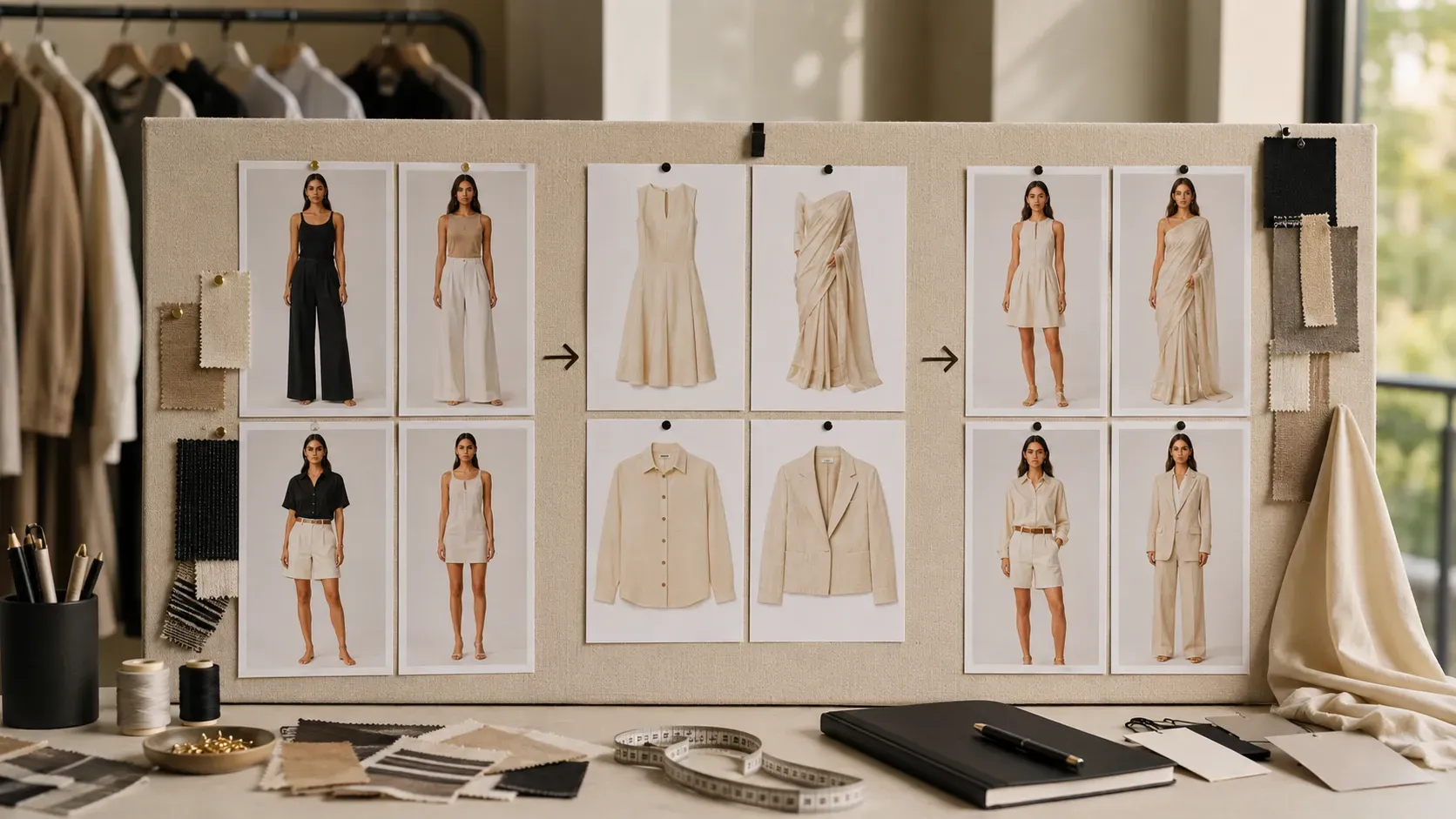
With Virtual Try-On AI, brands can upload a target model photo and a garment image, then generate a realistic model-worn product image using artificial intelligence.
The AI fits the garment onto the model and creates a visual that looks like a professional fashion product photo.
The Textile AI Virtual Try-On tool is built for this exact workflow.
It helps users:
- Upload a model photo
- Upload a garment image
- Add optional refinement instructions
- Generate the try-on result
- Download the final image
- Create a video ad from the output
Tool link:
https://www.thetextileai.com/ai/tools/virtual-try-on
What is Virtual Try-On AI?
Virtual Try-On AI is a technology that digitally places a garment onto a model image.
In simple words, it helps you see how a clothing item may look when worn by a person, without arranging a physical photoshoot.
The user uploads two main inputs:
- A target model photo
- A target garment image
Then the AI studies:
- Model body position
- Lighting
- Garment shape
- Fabric behavior
- Folds
- Visual alignment
After processing, it generates a realistic try-on image where the garment appears fitted on the model.
This is useful for fashion brands because it turns simple product inputs into model-worn visuals.
Instead of showing only a flat clothing photo, the brand can show a final styled product image.
“Virtual Try-On AI turns a garment image into a wearable product visual.”
Why Model-Worn Product Images Matter
Fashion customers buy with their eyes first.
Before reading product descriptions, customers look at the image.
They want to know whether the outfit looks:
- Attractive
- Wearable
- Stylish
- Realistic
- Premium
- Easy to understand
A flat product image gives basic information, but it does not always show the full value of the garment.
A model-worn product image helps customers understand:
- How the garment looks when worn
- How the fabric falls on the body
- How the outfit fits visually
- How the product looks in catalog style
- How the color appears on a person
- How the garment can be styled
This makes the product easier to understand.
For online stores, this is very important because customers cannot physically try the product before buying.
Remember: In fashion e-commerce, a good product image can create trust before the customer reads a single line of text.
The Problem with Traditional Fashion Photoshoots
Traditional fashion photoshoots are powerful, but they are not always practical for every product.
A brand may need model images for hundreds of garments.
Each product may need different:
- Poses
- Backgrounds
- Styles
- Campaign formats
- Product angles
- Editing versions
If every product needs a full photoshoot, the cost becomes very high.
A normal fashion photoshoot may include:
- Model booking
- Studio rental
- Photographer
- Stylist
- Makeup artist
- Lighting setup
- Garment preparation
- Shoot planning
- Image editing
- Retouching
- Final exports
This process can take days or weeks.
For small brands, it can be expensive.
For large brands, it can be difficult to scale.
For fast-moving fashion sellers, it can slow down product launches.
Virtual Try-On AI helps reduce this dependency by creating model-worn images digitally.
Tip: Use AI try-on visuals when you need fast product previews, catalog images, website visuals, or campaign drafts before arranging a large photoshoot.
How Virtual Try-On AI Works
The workflow is simple and user-friendly.
You do not need advanced design skills.
You only need:
- A clear model photo
- A garment image
- Optional refinement instructions
The Textile AI Virtual Try-On tool is designed like a try-on studio canvas.
The user uploads the model photo, uploads the target garment image, adds a refinement prompt if needed, and generates the result.
The final output can be:
- Viewed
- Downloaded
- Used for catalog planning
- Used for product pages
- Converted into a video ad workflow
This makes it useful for both creative teams and business users.
Step 1: Upload the Target Model Photo
The first input is the target model photo.
This is the person on whom the garment will be shown.
The model photo should be:
- Clear
- Well-lit
- Suitable for fashion visualization
- Properly framed
- Clean enough for AI fitting
A clean full-body or half-body image usually works better because the AI needs to understand the model’s posture, body shape, and visible clothing area.
The tool supports image upload and includes an image cropper, which helps users prepare the image before generation.
This is useful because cropping can improve framing and help the AI focus on the model properly.
A good model photo can improve the final try-on quality.
Tip: Use a model image with clear pose, clean lighting, and visible body structure for better try-on results.
Step 2: Upload the Target Garment Image
The second input is the garment image.
This can be:
- Clothing photo
- Fashion product image
- Garment design
- Apparel reference
- Product catalog image
- Outfit image
The garment image should clearly show the product.
If the garment is unclear, folded, badly lit, or heavily covered, the AI may not understand the outfit properly.
The better the garment image, the better the final try-on output.
This step is important because the garment is the main product being fitted on the model.
For fashion brands, this means they can upload product images and create model-worn visuals without needing to dress the garment physically on a model.
Remember: A clean garment image gives the AI better product information and helps create a more realistic fitting result.
Step 3: Add Refinement Prompt
The Virtual Try-On tool also includes an optional refinement prompt.
This allows the user to guide the AI output.
For example, a user can write instructions like:
Match model shadows and keep natural fabric folds.
Make the outfit fit naturally on the model.
Keep the garment shape realistic.
Use a clean e-commerce catalog look.
Maintain natural lighting and product accuracy.
This is useful when a brand wants more control over the final result.
The refinement prompt can help guide:
- Fit
- Lighting
- Shadows
- Background mood
- Styling direction
- Catalog look
- Product realism
It is optional, but it can improve results when used correctly.
Tip: Keep refinement prompts simple and clear. Tell the AI what style you want and what details should stay realistic.
Step 4: Generate the AI Fitting Result
After the model image and garment image are uploaded, the user can generate the try-on result.
The tool uses 5 credits per generation.
Cost:
5 Credits / Action
Once generated, the final image appears in the AI fitting result area.
The user can:
- View the output
- Download it
- Reset the studio
- Use the result for further content creation
This gives fashion brands a fast way to create model-worn product visuals from existing garment images.
“What once required a full shoot setup can now begin with one model image, one garment image, and an AI generation.”
Step 5: Download or Use the Output
After the AI try-on is generated, the final image can be downloaded as a product asset.
This is useful for:
- Product catalog previews
- Shopify product pages
- Website visuals
- Buyer presentations
- Social media posts
- Campaign drafts
- Internal design review
- Online store listings
The tool also supports creating a video ad from the generated image.
This is useful because fashion content is no longer limited to static images.
Brands need:
- Videos
- Reels
- Ads
- Motion content
- Product teasers
- Campaign assets
With this workflow, one AI try-on result can become the starting point for more marketing assets.
Why Virtual Try-On AI is Useful for Fashion Brands
Virtual Try-On AI is useful because fashion brands need speed and scale.
A brand may have many garments, but limited time to create model photos for every product.
AI helps create visual content faster and reduces the pressure of traditional production.
It also gives brands more flexibility.
They can:
- Test garments on different models
- Create product previews
- Prepare catalog visuals
- Review styling before shoots
- Build content faster
- Plan campaigns more easily
For fast-moving fashion businesses, this speed is valuable.
A product can move from garment photo to model-worn image much faster.
Benefit 1: Faster Product Image Creation
One of the biggest benefits of Virtual Try-On AI is speed.
Traditional model photos take time because there are many steps.
AI shortens the process.
A fashion seller can upload a model image and garment image, generate a try-on visual, and use the result for presentation or product content.
This is useful when brands need to launch products quickly.
For example, if a new collection is ready but model photos are pending, Virtual Try-On AI can help create early visuals faster.
Remember: Faster product images can help brands launch faster, test faster, and sell faster.
Benefit 2: Lower Photoshoot Dependency
Photoshoots are still important for premium campaigns, but not every product needs a full shoot at the early stage.
Virtual Try-On AI helps reduce repeated photoshoot dependency.
A brand can use AI try-on images for:
- Early product previews
- Catalog drafts
- Social media concepts
- Buyer presentations
- Website visuals
- Internal product review
Then, if a product becomes important, the brand can plan a final physical photoshoot.
This makes the workflow smarter.
Instead of spending heavily on every product, brands can use AI to test and prepare visuals first.
“AI does not remove fashion photography. It helps brands decide where photography is really needed.”
Benefit 3: Better E-commerce Product Presentation
Online fashion stores need images that make products easy to understand.
A flat garment photo may not show how the outfit looks when worn.
A model-worn image gives more visual context.
This helps customers understand the product better.
For Shopify stores and online marketplaces, this can improve the product page experience.
A product page with model-worn images looks more complete and professional.
This is especially useful for:
- Dresses
- Tops
- Kurtis
- Shirts
- Sarees
- Co-ord sets
- Jackets
- Ethnic wear
- Western wear
- Fashion catalog collections
A stronger product image can make the customer feel more confident.
Benefit 4: Useful for Catalog and Lookbook Planning
Fashion catalogs need consistency.
A brand may want every product image to follow a similar visual style.
Traditional photoshoots can make this difficult because lighting, background, model pose, and editing may change from shoot to shoot.
Virtual Try-On AI can help create more consistent product visuals.
Brands can use it to prepare:
- Catalog previews
- Lookbook drafts
- Collection pages
- Product grids
- Product galleries
- Buyer catalog visuals
This is useful when teams need to plan a catalog before final production.
A model-worn AI preview can help decide which products deserve more focus in the final catalog.
Tip: Use Virtual Try-On AI during catalog planning to quickly check which garments look strongest on models.
Benefit 5: Better Buyer and Client Communication
Fashion businesses often need to present products to buyers before production or before a final shoot.
A garment image alone may not be enough.
A buyer may want to know:
- How it looks on a model
- Whether the shape looks attractive
- How the outfit works in catalog style
- Whether the product looks buyer-ready
- How the style appears visually
Virtual Try-On AI makes presentation easier.
Instead of sharing only product photos, brands can show model-worn visuals.
This is useful for:
- B2B fashion sellers
- Wholesalers
- Manufacturers
- Boutiques
- Design teams
- Catalog planners
Clear visuals reduce confusion and help buyers make decisions faster.
Remember: Better presentation can turn a simple garment image into a more convincing product story.
Benefit 6: More Creative Testing
Virtual Try-On AI also supports creative testing.
A brand can try different garments on a model.
A designer can test how a new outfit looks before planning a shoot.
A marketer can test different visual directions for campaigns.
The optional prompt allows more control.
For example, the user can ask for:
- Natural shadows
- Clean catalog appearance
- Better fit
- Realistic folds
- Specific visual mood
- Product-focused styling
This gives creative teams more freedom.
They can experiment before spending money on full production.
Virtual Try-On AI for Shopify Stores
Shopify fashion stores need clean and attractive product images.
A customer visiting a Shopify store quickly decides whether the product feels trustworthy.
Images play a major role in that decision.
Virtual Try-On AI helps Shopify sellers create model-worn product visuals without arranging a full model shoot for every item.
These visuals can be used for:
- Product pages
- Collection pages
- Homepage sections
- Campaign previews
- Email marketing
- Social media ads
- WhatsApp sharing
A Shopify store with model-worn images can feel more complete than a store that only shows flat garment photos.
Tip: Use model-worn AI images as main product visuals and keep original garment images as additional detail photos.
Virtual Try-On AI for Boutiques
Boutiques can use Virtual Try-On AI to show clothing ideas to customers.
A boutique may have a garment image or design reference and want to show how it can look on a model.
This can help during:
- Custom order discussions
- Collection planning
- Social media promotion
- Client presentations
- Product preview creation
For boutique owners, AI try-on can reduce the need to arrange every small shoot.
It can also make product presentation more modern.
Customers often understand visuals faster than verbal explanation.
Showing a model-worn preview can make the buying decision easier.
Virtual Try-On AI for Textile and Garment Manufacturers
Manufacturers can use Virtual Try-On AI for product presentation.
A garment manufacturer may have product samples, flat garment images, or apparel designs.
Instead of waiting for a full photoshoot, they can create model-worn images for buyer previews.
This is useful for:
- Buyer catalogs
- Export presentations
- Product development
- Design approvals
- B2B communication
- Collection previews
- Internal team review
For manufacturers, faster visual presentation can reduce delays in buyer approval.
Virtual Try-On AI for Social Media Marketing
Fashion social media needs fresh content constantly.
Instagram, Facebook, Pinterest, and WhatsApp selling depend heavily on strong visuals.
Virtual Try-On AI helps create model-worn content faster.
A brand can use AI try-on images for:
- Instagram posts
- Story creatives
- Reels covers
- Product launch posts
- Ad creatives
- Festive campaign visuals
- New arrival announcements
- WhatsApp catalog sharing
This helps brands stay active online without waiting for new photoshoots all the time.
Remember: Social media rewards consistent content. AI helps fashion brands create that content faster.
Virtual Try-On AI vs Traditional Photoshoot
Virtual Try-On AI and traditional photoshoots both have value.
Traditional photoshoots are useful for final campaigns, luxury brand storytelling, influencer shoots, celebrity shoots, and premium editorial content.
Virtual Try-On AI is useful for speed, scale, testing, product previews, catalog planning, and daily e-commerce content.
A smart brand can use both.
Use AI try-on for fast product visuals and early decision-making.
Use traditional photoshoots for selected hero products and campaign storytelling.
This creates a balanced workflow.
“The future is not AI versus photoshoots. The future is AI plus smarter photoshoot planning.”
How AI Helps Reduce Returns
Product returns are a common challenge in online fashion.
Customers may return products because the final look is different from what they expected.
Virtual Try-On AI can help reduce confusion by showing garments on models more clearly.
It gives customers a better idea of the outfit’s visual appearance.
Of course, AI cannot fully solve size, fabric feel, or personal fit issues.
But it can improve visual expectation.
When customers understand the product better before buying, they may make better decisions.
This can support a healthier e-commerce experience.
Quality Matters in Virtual Try-On
AI outputs should be reviewed before publishing.
The model-worn result should look realistic, natural, and close to the product.
The garment should not look pasted or distorted.
The lighting and shadows should match the model.
The fit should look believable.
The user should check:
- Garment shape
- Sleeve placement
- Neckline alignment
- Fabric folds
- Color accuracy
- Shadow matching
- Model posture
- Overall realism
This quality check is important because product images affect customer trust.
Tip: AI can speed up visual creation, but your team should still review the final output before using it in live product pages.
How to Get Better Virtual Try-On Results
Better input images create better outputs.
Use a clear model photo with good lighting.
Make sure the body area where the garment will appear is visible.
Avoid overly complex poses if you want clean catalog-style output.
Use a clear garment image.
The garment should be visible and not hidden by heavy shadows or folds.
If possible, use a clean product image with proper shape.
Use refinement prompts when needed.
For example:
- If you want a catalog-style result, mention clean product look and natural lighting.
- If you want better realism, mention natural folds, realistic shadows, and proper fit.
- If you want product accuracy, mention that the garment shape and color should stay close to the reference.
A simple and clear prompt can help guide the result.
Remember: AI works best when your inputs are clear and your instructions are specific.
Why The Textile AI Virtual Try-On Tool is Useful
The Textile AI Virtual Try-On tool is useful because it is made for fashion and textile workflows.
It allows users to:
- Upload a target model photo
- Upload a target garment image
- Add a refinement prompt
- Generate an AI fitting result
- Download the output
- View it fullscreen
- Create a video ad
- Reset the studio
- Access generation history
This makes it practical for fashion businesses that need fast model-worn visuals.
It is useful for:
- Fashion brands
- Shopify sellers
- Boutiques
- Textile businesses
- Garment manufacturers
- Catalog planners
- Social media sellers
- E-commerce teams
- Fashion marketers
Tool link:
https://www.thetextileai.com/ai/tools/virtual-try-on
The Future of Model-Worn Fashion Images
Fashion product images are becoming faster, more digital, and more AI-powered.
In the future, brands may not wait for a full photoshoot before seeing every garment on a model.
They may first use AI try-on to:
- Create fast previews
- Test product visuals
- Plan catalogs
- Prepare marketing content
- Review garment presentation
- Build early campaign drafts
Traditional photography will still have a role.
But AI will become a daily workflow tool.
It will help brands create product images quickly, test different looks, improve presentations, and launch faster.
For online fashion selling, this can be a major advantage.
Final Thoughts
Virtual Try-On AI is changing how fashion brands create model-worn product images.
Instead of depending only on traditional photoshoots, brands can upload a model photo and garment image to generate realistic try-on visuals instantly.
This helps:
- Save time
- Reduce photoshoot dependency
- Improve product presentation
- Support catalog planning
- Create faster marketing content
- Improve buyer communication
- Make product visuals more scalable
For Shopify sellers, boutiques, textile businesses, garment manufacturers, and fashion brands, Virtual Try-On AI can become a powerful visual tool.
It does not replace creativity.
It makes creative production faster.
Try The Textile AI Virtual Try-On tool here:
https://www.thetextileai.com/ai/tools/virtual-try-on